Spot against your own picture
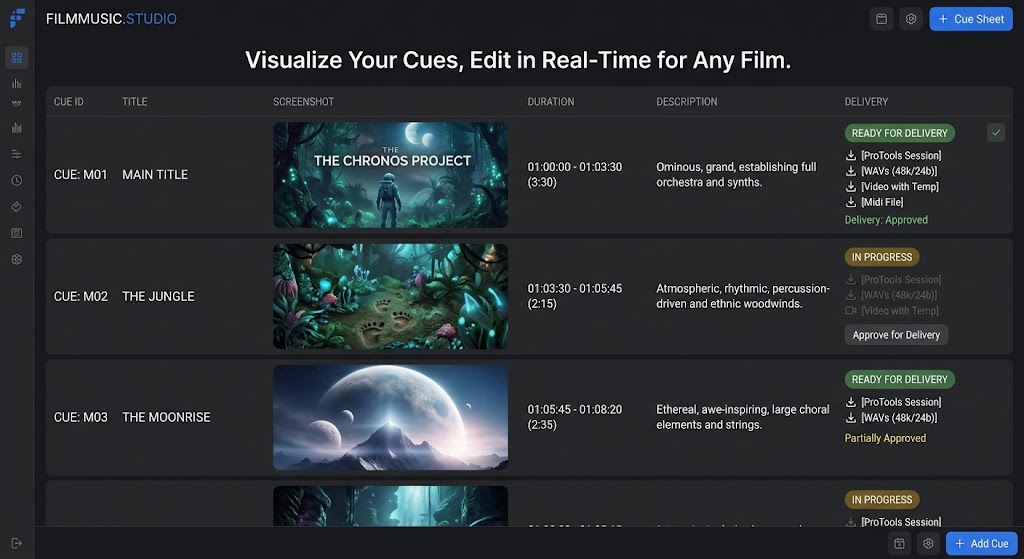
Link the movie file from your drive and scrub it frame-accurately. Mark cue points at the playhead and grab the frame as that cue's marker — so the list shows the shot, not just a timecode.
Spot to picture, track every cue from sketch to delivery, and hand the production a cue sheet that gets accepted the first time.
Your picture never leaves your machine. Reference the movie file straight off your drive — nothing is uploaded until you deliberately publish a review version.
We are letting composers in a few at a time. Tell us what you are scoring and we will send an invite code — your work saves to your account from the first cue.
Request an invite → New scoreFeature, episode, short or spot — the answers reshape reels, cue numbering and which columns you get. Choose how much detail you actually want to track.
Create a project → InvitedDirector, producer, editor, mixer or orchestrator. Pick your role and see exactly what it lets you see and change before you accept.
Accept an invite →Link the movie file from your drive and scrub it frame-accurately. Mark cue points at the playhead and grab the frame as that cue's marker — so the list shows the shot, not just a timecode.
Reel-aware cue numbering, drop-frame handling, and lengths that recalculate the moment an in or out changes. Set the start offset by hand, or read the burnt-in timecode off the picture.
A spot needs six fields. A feature with an orchestra needs forty. Switch column groups on as the job demands and save the layouts you keep coming back to.
Track WAVs, stems, sessions, MIDI and score per cue, with approval state attached. The part of the job that actually eats your week.
Invite by role, and access follows two independent axes: how much someone can do, and which columns they can touch. An orchestrator and a mixer sit at the same level but reach different fields. A director and a producer reach the same fields at different levels.
Every role is a preset you can edit — not a fixed list you're stuck with.